Evidence-based guide
Best Daily Log Apps: Choose by the Record You Need
Compare daily log app approaches for structured life context, journaling, mood tracking, flexible databases, and cross-platform archives.
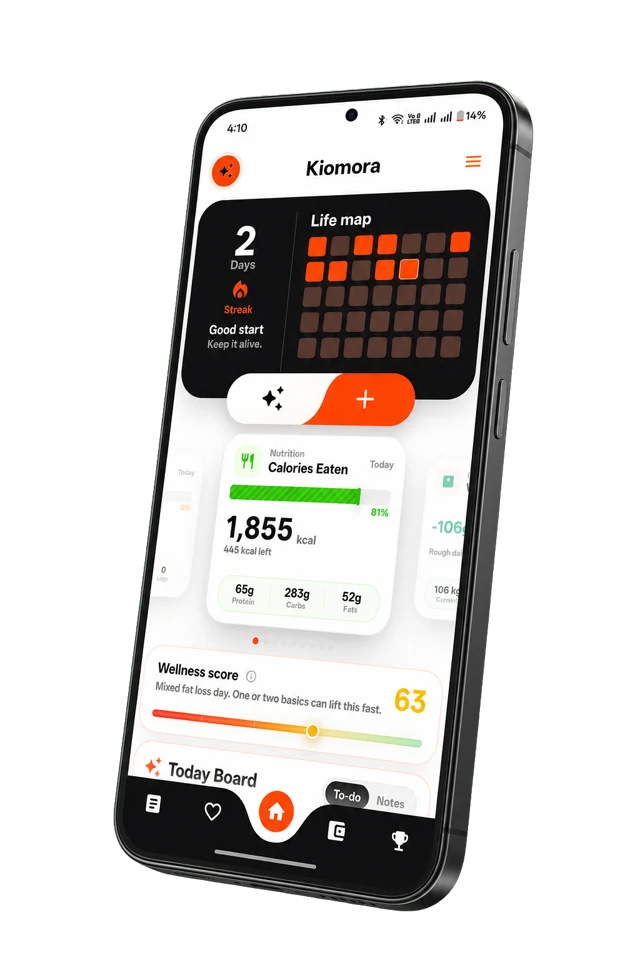
Kiomora for daily context
Your life, connected
Keep habits, wellness, spending, notes, and memories together so the details stay useful later.
Explore KiomoraA “daily log app” can mean a diary, mood tracker, habit grid, personal database, or an app that connects multiple parts of a day. Those are different products, even when store descriptions use similar words.
How this comparison was made: Product details were checked against the linked official provider documentation on July 28, 2026. This is documentation-backed research, not a claim that the Kiomora team bought and performance-tested every paid plan. See the full comparison methodology.
Choose by the job, not the feature count
| Need | Approach | Tradeoff to check |
|---|---|---|
| One connected daily record | Kiomora | Export is not currently available |
| Long-form multimedia journal | Day One | Voice and AI depend on paid tiers |
| Fast mood and activity check-in | Daylio | Less suited to detailed narrative |
| Broad desktop and mobile archive | Journey | Plan and platform access can be complex |
| Fully custom database | Notion | You maintain the system |
Kiomora: when a day crosses categories
Kiomora is designed for context across food, water, fasting, sleep, activity, weight, expenses, notes, mood, habits, and memories. SuperLog can turn one text, voice, or photo update into suggested cards that remain reviewable before saving.
It fits someone who wants to say “I walked after class, bought groceries, and called my sister” without opening three forms. See the daily log workflow and pricing source of truth.
Day One: when the narrative archive matters most
Day One documents unlimited entries and journals on Basic, with templates, prompts, export, and one-device backup. Paid tiers add media, audio, sync, and AI. Verify the Day One pricing and features guide.
Daylio: when speed and mood check-ins matter
Daylio is positioned around quick mood and activity entries. That can be easier to maintain, but a compact mood log is not the same as a detailed account of people, decisions, events, and expenses.
Because prices vary by store and region, inspect the live listing before paying. Read Kiomora vs Daylio for workflow fit.
Journey: when cross-platform reach matters
Journey documents timeline, calendar, map, photo, media, search, and export across mobile, desktop, and web. Review the Journey plan comparison because free, platform, and membership access differ.
Notion: when you want to build the system
Notion can support a custom daily log with properties, relations, templates, views, and formulas. Its strength is flexibility. Its cost is that you define the capture flow and maintenance.
Read the Notion tracking guide to decide whether building the database is value or friction.
A practical selection checklist
- Write one question the log should answer.
- Choose the smallest capture method for an ordinary day.
- Check whether names, dates, notes, and quantities remain editable.
- Test whether you can find an old entry without scrolling.
- Check export, deletion, platform, and price.
- Use it for seven days, then remove fields before adding more.
Start with the free Daily Log Template Builder before choosing an app.
Common questions
Practical answers before you begin
- What is the best app for keeping a daily log?
- Choose by the record you need: Kiomora for connected multi-category context, Day One for narrative and multimedia journaling, Daylio for quick mood and activity check-ins, Journey for a cross-platform archive, or Notion for a self-built database.
- What should a daily log include?
- Start with what happened, one current routine or goal, one context field such as energy, and one moment worth remembering. Add fields only when the record leaves a repeated question unanswered.
- Is a daily log different from a journal?
- A daily log is usually compact and factual; a journal often gives more space to interpretation and narrative. Many useful systems combine both.
Don't forget to try Kiomora
See more thanone detail
Keep the useful parts of each day in one record you can return to.
Explore Kiomora